













How to Tell If a Phone Is Unlocked Without a SIM Card
Five reliable ways to confirm whether your iPhone or Android is tied to a specific carrier. No SIM tray needed.

Picked up a second-hand handset, inherited a friend’s old device, or bought one from a marketplace seller? Before you go shopping for a new plan, you need to know whether the phone is carrier-locked. A locked device only works with the operator it was originally sold through, while an unlocked one accepts any compatible SIM or eSIM. The easiest test is dropping in a different SIM card and seeing what happens, but if you don’t have one on hand, there are still several ways to figure it out. The methods below cover both iPhone and Android, work without a SIM, and tell you what to do once you have an answer.
The short answer
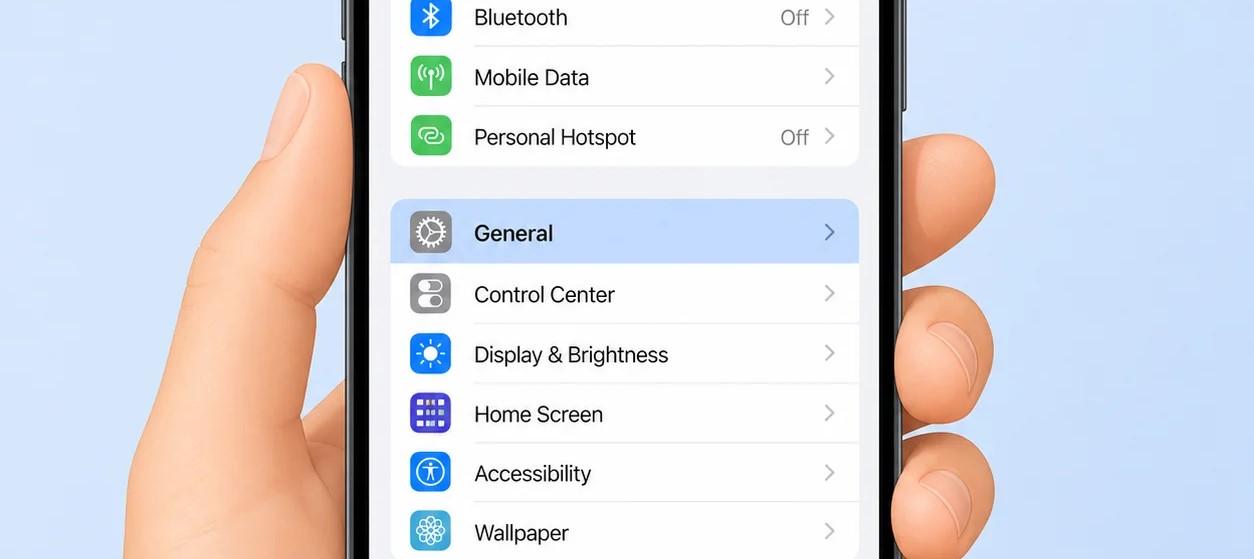
- On iPhone, open Settings → General → About and look for Carrier Lock. “No SIM restrictions” means the phone is free; “SIM locked” means it isn’t.
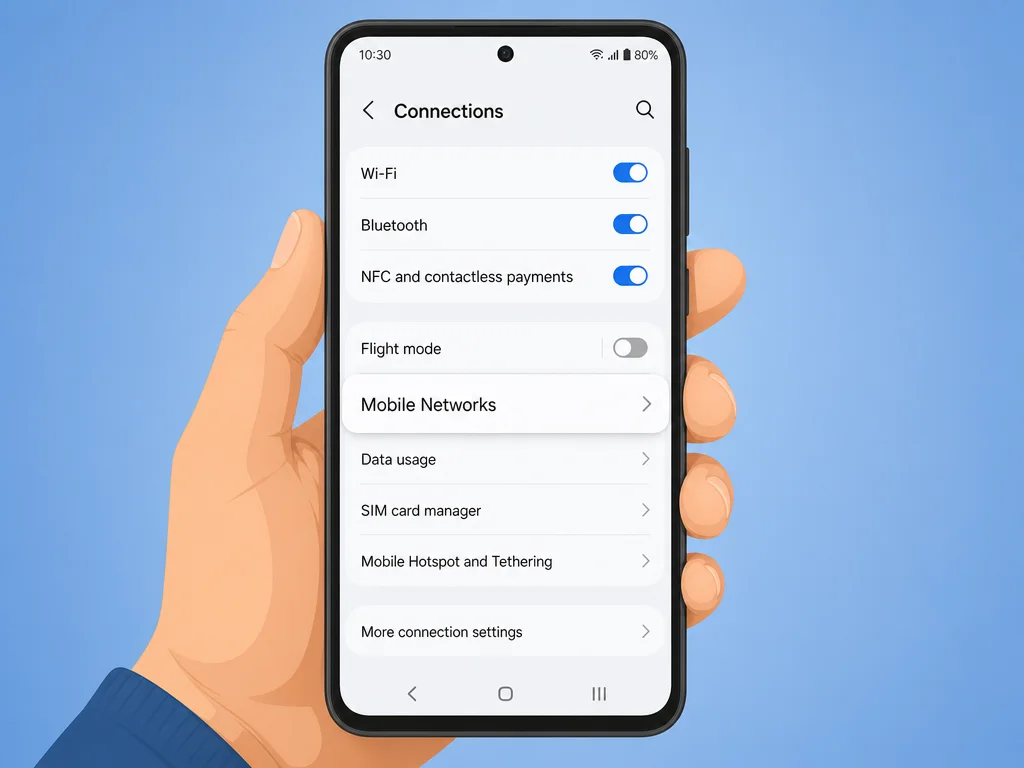
- On Android, head to Settings → Connections → Mobile Networks → Network Operators → Search Now. If several carriers show up, the phone is probably unlocked.
- You can also enter the phone’s IMEI into an online lookup tool to get a status report.
Check the Settings menu on iPhone
-
Launch the Settings app.
Tap the icon shaped like two grey cogs on your home screen or in the App Library. This works on every iPhone running iOS 14 or newer.
-
Tap “General”.
You’ll find it near the top of the Settings list, usually in the third grouping under Notifications and Sounds.
-
Open “About”.
It sits right at the top of the General menu. This screen lists hardware and network details for your device.
-
Scroll until you see “Carrier Lock”.
On older iPhones this row may be labelled “Network Lock” instead. Read the value next to it:
- No SIM restrictions means the iPhone is unlocked and ready for any compatible carrier.
- SIM locked means the phone is tied to a specific network and won’t accept other SIMs without an unlock code.
If it’s locked: the carrier listed on the original purchase receipt is the one you’ll need to contact about unlocking it.
Check the Settings menu on Android
-
Open Settings.
Pull down from the top of the screen to reveal the quick-toggle panel, then tap the cog icon in the upper-right corner. You can also launch Settings from the app drawer.
Heads up: menu names vary between Samsung, Google Pixel, OnePlus, and other brands. The path described here works on most Samsung Galaxy devices and is similar elsewhere. -
Tap “Connections” or “Network & Internet”.
Samsung calls this section Connections; stock Android and Google Pixel devices label it Network & Internet. Both lead to the same set of options.
-
Open “Mobile Networks”.
Depending on your phone this may also appear as “Cellular Network” or simply “Networks”. It’s the section that holds your data and roaming controls.
-
Tap “Network Operators”.
This option is usually at the bottom of the Mobile Networks screen. It lets you scan for available carriers in your area.
Can’t tap it? If the option is greyed out or refuses to open, that’s a strong sign your phone is locked to its current network. -
Tap “Search Now” and watch the list.
Your phone will scan the radio frequencies around you for available networks. After a few seconds:
- If you see multiple carriers appear, the device is most likely unlocked.
- If only the original carrier shows up, the phone is probably locked.
Note: this test isn’t perfect. A locked phone can occasionally surface other networks in the list, so treat it as a strong hint rather than a guarantee.
Run the IMEI through an online checker
-
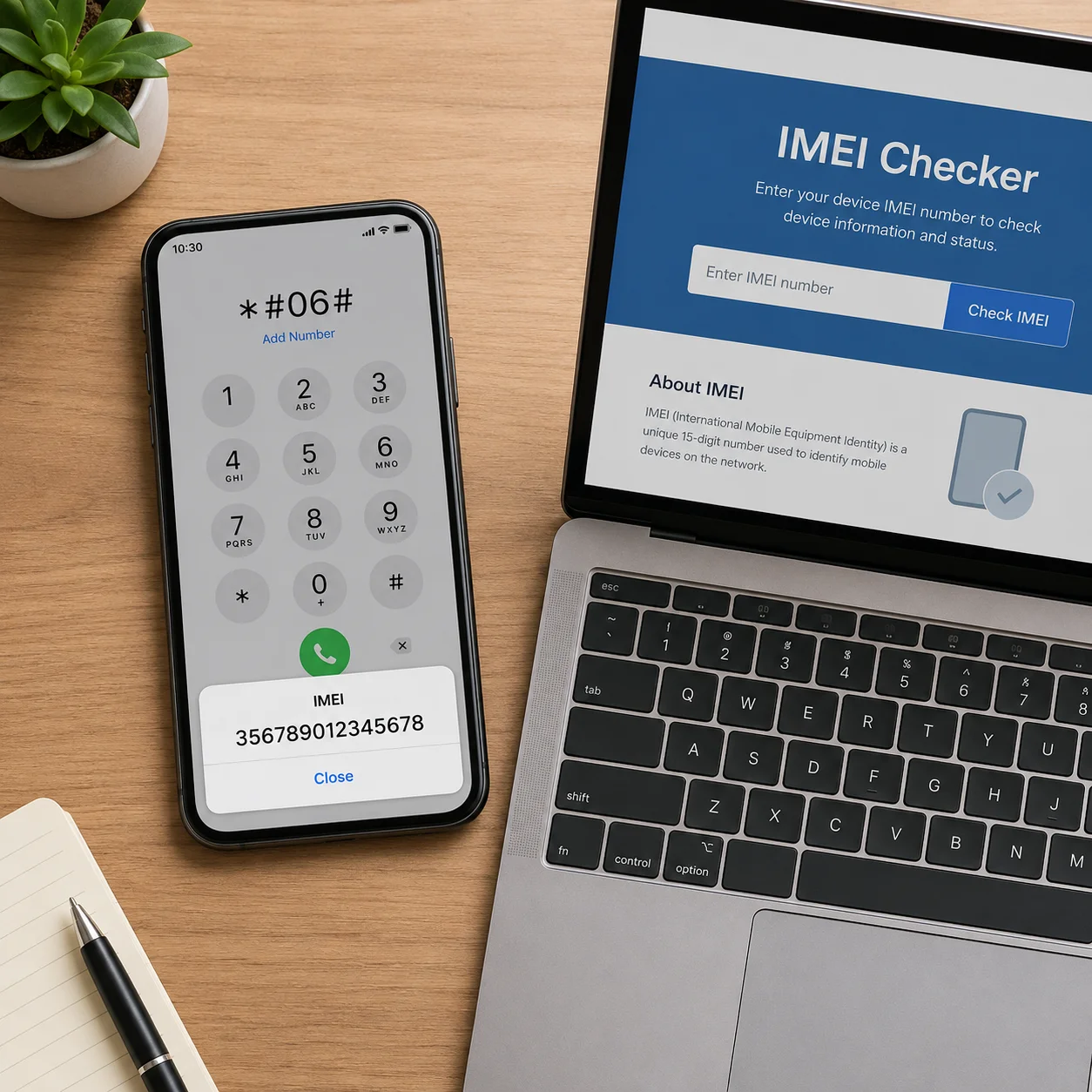
Dial
*#06#on the phone keypad.You don’t need to press the call button. The moment you finish typing the code, a pop-up appears with the device’s 15-digit IMEI (and, on dual-SIM models, two IMEIs). Write the number down or take a screenshot.
- This shortcut may not work on some Verizon devices, which use MEID numbers instead.
- You can also find the IMEI under Settings → About on Android, or under Settings → General → About on iPhone. On iPhone 6 and newer the number is laser-etched onto the SIM tray itself.
- The IMEI is a unique fingerprint for the hardware. Networks and resellers use it to confirm whether a device is locked, financed, or flagged as lost/stolen.
-
Visit a reputable IMEI lookup site.
A free service like sickw.com will give you a basic status report, including lock state, at no cost. Paid services such as imeicheck.com and imei.info tend to offer more detail.
Be cautious: not every IMEI service is accurate, and some are outright scams. Read recent reviews before paying anything, and never enter your IMEI on a site that demands personal details. For absolute certainty, the carrier the phone was sold through is still the best source of truth. -
Enter the IMEI and run the check.
Type the 15-digit number into the lookup field and click the check or submit button. Some services email the report back to you; most display it on screen within a few seconds.
-
Look for the “SIM-Lock Status” field.
Scroll through the report and find the line referring to lock state. “Unlocked” or “No carrier lock” is the answer you want. “Locked” or a specific carrier name means the device is restricted to that network.
About unlock offers: many of these websites will offer to remotely unlock your phone for a fee. Results vary wildly and the work is often unofficial. The cleanest route is always to ask the carrier directly.
Phone your carrier, or the previous one

-
Dial
611or the customer service line of the network you plan to use.Most carriers keep a database of IMEIs that are compatible with their network and can confirm whether a device is locked elsewhere. Hold times can be long and not every agent has access to the lookup, so be patient. If you know which carrier the handset was originally sold through, try them as well, since they can confirm definitively.
Major US carrier numbers to keep handy:
Carrier Customer service T-Mobile / Sprint 1-800-937-8997 Verizon 1-800-837-4966 AT&T Wireless 1-800-331-0500 Before you ring: have the IMEI written down and, if possible, the original purchase receipt or account holder’s name on hand. It speeds the conversation up dramatically.
Borrow a different SIM card
-
Find a SIM from a different network.
If you just want to confirm the phone works on your own plan, use your existing SIM. To test for unlock status specifically, borrow one from a friend on a different carrier, or take the phone into a mobile shop and ask them to try a test SIM, which most will happily do.
-
Power the phone off.
Always insert or remove a SIM with the device switched off. Hot-swapping can occasionally corrupt the SIM or confuse the modem.
-
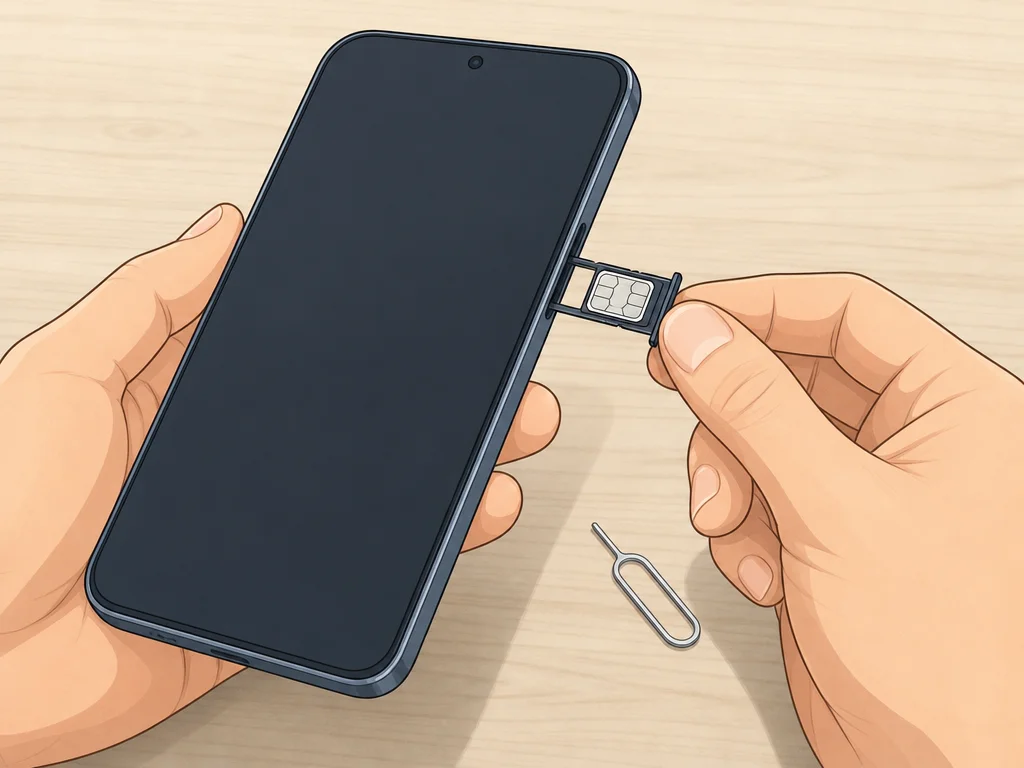
Pop in the SIM card.
On most modern phones the SIM tray sits along the top or side edge. Look for a small oval slot with a pinhole, push a SIM-ejection tool (or a straightened paperclip) into the hole, and the tray will slide out. Drop the new SIM in, oriented the same way as the original, and reinsert the tray flush with the body.
- Older Android handsets with removable backs hide the SIM beneath the battery. Pry the back cover off, lift the battery out, and you’ll see the slot.
- If you’re not sure where the tray is, search the model name plus “SIM tray location” or check the manufacturer’s online manual.
-
Switch the phone back on.
If the device is locked, you’ll see a prompt asking for a network unlock code (sometimes called a NUC or NCK). You’d need to request that code from the carrier that originally sold the phone, and it isn’t something you can guess.
-
Try placing a call.
If no unlock prompt appears, open the Phone app and ring any number, such as your own mobile, a friend, or a free service line. If the call connects and you can hear the other end, the phone is unlocked. If it fails or shows a network error, the device is almost certainly locked.
Pro tip: if you get a specific error code, write it down and search for it online. Some error messages are genuinely network-related rather than lock-related, so the code helps narrow things down before you write off the phone.
Frequently asked questions
Does the IMEI actually reveal whether a phone is unlocked?
Yes. The IMEI is tied to your specific device and most carriers (plus a handful of third-party lookup sites) can use it to confirm lock status. Just remember that not every lookup service is trustworthy; cross-check anything suspicious with the original carrier.
If I swap the SIM card, does the IMEI change?
No. The IMEI belongs to the hardware itself, not to the SIM. You can change SIMs as often as you like, or have no SIM at all, and the IMEI stays the same.
Is dialling *#06# safe?
Completely safe. It’s a globally standardised shortcode that simply tells the phone to display its IMEI. Nothing is sent anywhere and no settings are altered.
Why does it matter whether my phone is unlocked?
A locked phone is restricted to a single carrier’s network, so you can’t simply swap in a different SIM. That matters when travelling abroad with a local eSIM, switching to a cheaper plan, or selling the device to someone on another network. An unlocked phone gives you that freedom.
Can I unlock a phone myself?
Sometimes, but not reliably. The official route is to request an unlock from the carrier the phone is tied to, and most will do it for free once the device is paid off and the account is in good standing. Third-party unlock services exist, but quality varies and you risk voiding the warranty.